
Getting started with Rifaq
A quick tour of the Today screen, from the week strip and ticking tasks to notifications and tabs.
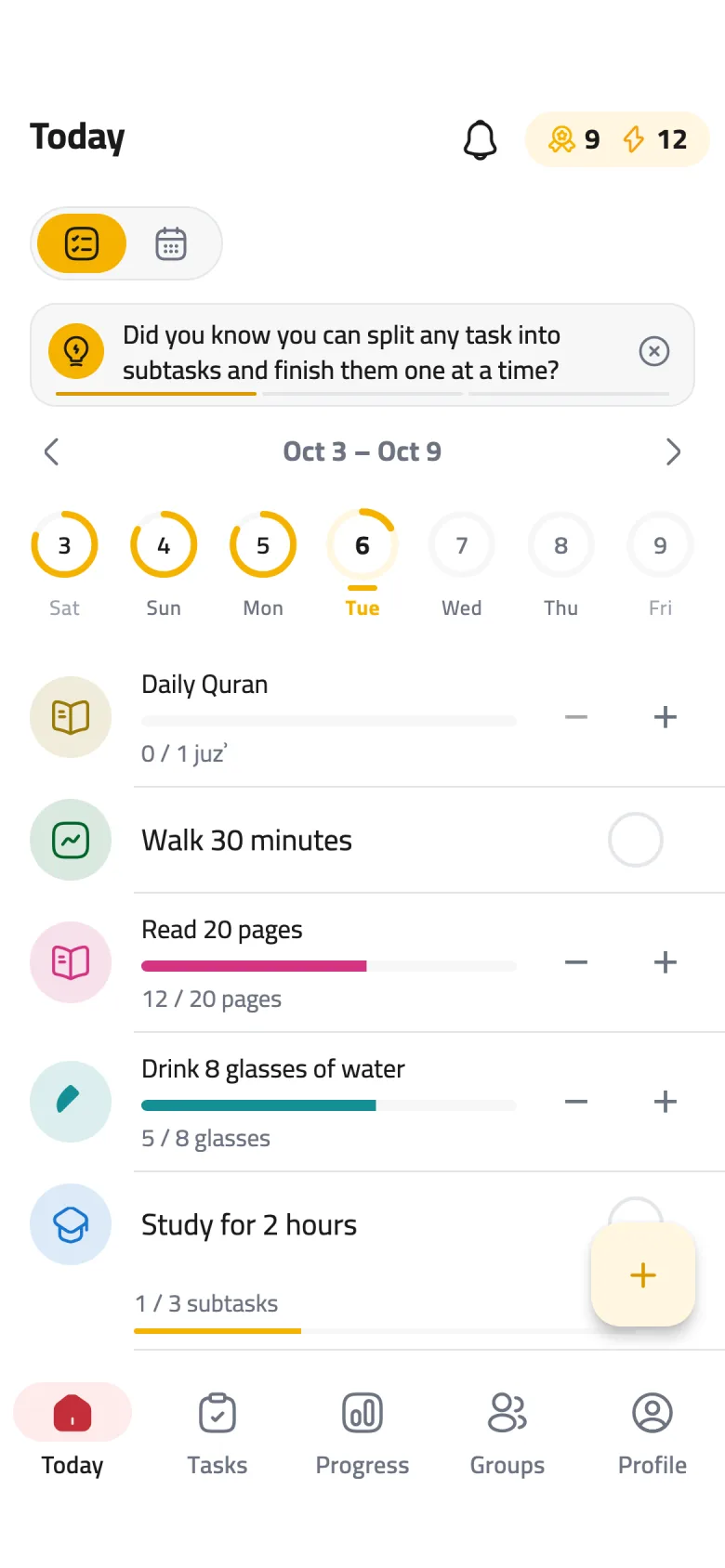
6 stepsThe Today screen is your home in Rifaq: your tasks for the day, and everything you need to get going. Here is what's on it.
-
Step 1 of 6
Browse your week
Each ring is a day of the week, and it fills up as you finish that day's tasks. Tap any day to see its tasks, and use the arrows or swipe the strip to move between weeks.
-
Step 2 of 6
Tick off a task
When you finish a task, tap the circle next to it. It fills with a check and your day's ring moves forward. Tapped it by mistake? Tap again to undo.
-
Step 3 of 6
Add a new task
The + button opens New task straight away. Write what you want to do, choose how often it repeats, and save.
-
Step 4 of 6
Keep up with notifications
The bell opens Notifications, where you'll find your achievements and news from your groups. A badge appears on it when something new is waiting.
-
Step 5 of 6
Your level and streak
The number next to the medal is your level; the one next to the lightning bolt is your streak in days. Tap them to jump to Profile.
-
Step 6 of 6
Move between tabs
Five tabs sit at the bottom: Today, Tasks, Progress, Groups and Profile. Tasks holds all your tasks and habits, and Groups is where you keep going together with friends.